Outreach
Every approach sent, every reply chased.
Your outreach account is connected once – your own, or one we set up for you – and the pipeline does the rest: a candidate moved to To Contact is approached, every message and reply lands on their record, and their stage moves as the conversation does.
How an approach runs
The software keeps the record. People keep the conversation.
From the longlist to the first call.
Outreach in Topliner is not a separate tool beside the search. It is the search: the stages drive the approaches, and the replies drive the stages.
-
Connect once
The workspace’s outreach account – your own, or one we set up for you – is connected in Integrations once. The key stays on the server, and nobody’s inbox is involved.
-
Pick who to approach
Move a candidate to To Contact – or let your client approve them from the portal – and they join the search’s campaign. Anyone on a do-not-contact list asks for a confirmation first.
-
Sent, and written down
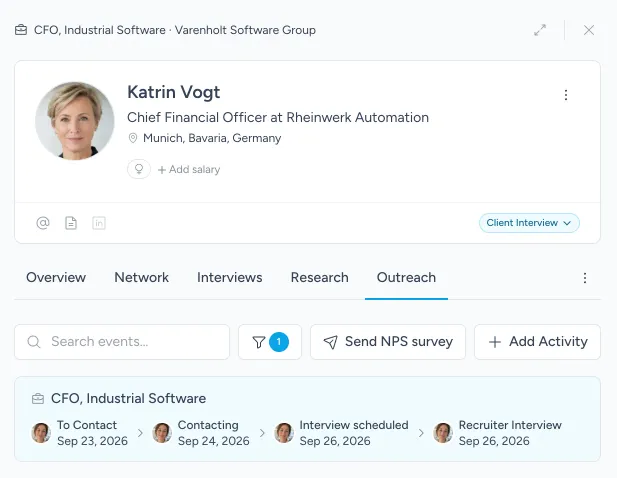
Every connection request, message and email that goes out lands on the person’s timeline with its full text. The first one moves them to Contacting on its own.
-
Every reply chased
Replies land on the candidate and the search they belong to, not in somebody’s inbox – and our talent operations team chases every one.
-
Booked, and moved on
When a candidate books an interview through the search’s scheduling link, the booking is logged and they move to Recruiter Interview.
-
Take the call
You meet the candidate knowing every message they were sent and everything they said back.
Keeping it moving
Nothing goes quietly cold.
-
One campaign per search
A live campaign is marked on the search and on the searches list, a click away from its sequence.
-
A search that tells you it is stalling
Longlist piling up, a cold start, low response, low interest: the search flags it before the client does.
-
Response and interest rates
Reported for every search and every owner, so you can see which approaches are working.
-
Do not contact means it
Blocks for a set time or for good, checked before anyone is approached.
-
Where each approach stands
Every person shows their outreach search by search, from To Contact to the first interview.
-
Candidate NPS
A short survey under your own name asks candidates how it went, and the scores reach your reports.
The platform
The rest of the platform.
- Research The whole market mapped, every company read by agents, every name checked by a researcher.
- Candidate insights What your team learned in every conversation, every employer researched, and who you know in common.
- ATS & client portal Every search, candidate and placement in one record, and a portal that shows your client the work.
- Copilot Ask your notes, pipelines and market maps a question, in Topliner or in the AI apps you already use.