ATS & client portal
An ATS built for retained search.
Every search, candidate, company, deal and placement in one record: a board your team works from, reports your partners read, and a portal that shows your client the work.
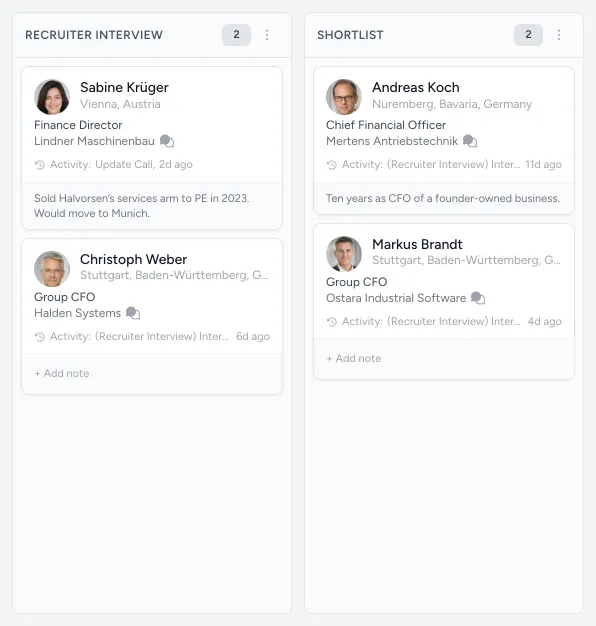
The record
One record, from the deal to the placement.
Built by people who run searches, for the way a search actually moves: business development, the mandate, the longlist, the approaches, the shortlist and the hire.
-
A board for every search
Kanban or list, from the longlist to the hire, with bulk moves, exports and a note on every card.
-
Stages that keep up
Log a call or an interview and the candidate moves forward on their own – never back.
-
People and companies
One CRM: add from a profile link, import in bulk, merge duplicates, keep lists, block who should not be approached.
-
Deals, then searches
Business development on pipelines of your own, each deal linked to the search it became.
-
A track record
Every placement in one place, filtered your way and exported in a click.
-
Searches at a glance
Every search by owner, status, practice and health, sorted by approval, response and time to shortlist.
The client portal
Your client sees the work. Not your workspace.
Only what you share
Clients see the searches you share with them, at the stages you choose, and never your workspace.
The assessment, not a spreadsheet
Each candidate with your assessment and résumé – and, if you choose, your researchers’ notes, compensation and tier.
Approve or decline
On the longlist a client approves a candidate, which starts the approach, or declines with one of six reasons.
Calibration that sharpens the brief
Early on, clients rate profiles from one to five stars with a note, and you see what they mean by “right”.
Feedback that reaches you
A client’s comment lands on the candidate and emails the team on the search.
In their AI apps too
With AI apps allowed on a search, a client can ask about it from ChatGPT or Claude.
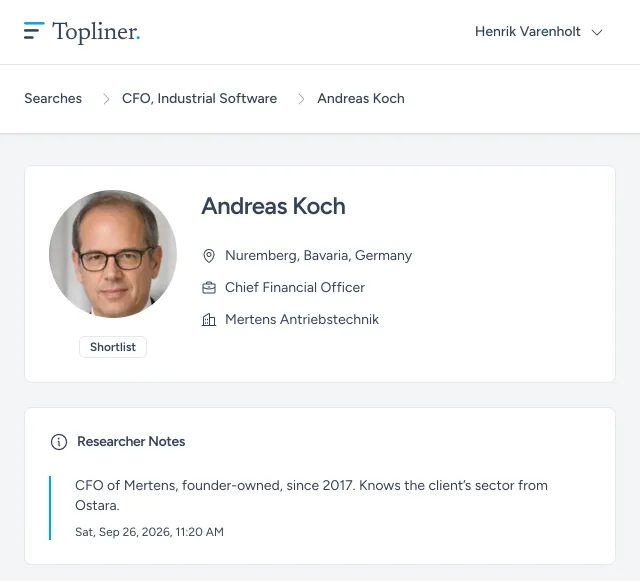
Reports
Reports your partners actually read.
-
Track record
Every placement the firm has made, in one place.
-
Commercial
Kick-offs, client shortlists, placements, client NPS, capacity and deals.
-
Research and talent ops
Approval, response and interest rates, and candidate NPS.
-
Every search
The current pipeline, the historical funnel and the reasons for rejection.
The platform
The rest of the platform.
- Research The whole market mapped, every company read by agents, every name checked by a researcher.
- Candidate insights What your team learned in every conversation, every employer researched, and who you know in common.
- Outreach Approaches go out from the search itself, and every reply comes back to the candidate it belongs to.
- Copilot Ask your notes, pipelines and market maps a question, in Topliner or in the AI apps you already use.